- Home
- Buyer's Guides
- Product Buyer's Guides
- Operating via Remote Control: A Buyer's Guide to Bobcat MaxControl
Operating via Remote Control: A Buyer's Guide to Bobcat MaxControl
Published on: 5 November 2026
In this article:
- You will learn how Bobcat MaxControl lets one operator run a compact loader and its attachments from outside the cab.
- You will discover how a view from the ground helps when positioning grapples in tight yards, grinding stumps near foundations, and transplanting trees.
- You will understand which loaders and attachments are compatible and what to check before you buy.
Some of the most nerve-racking minutes on a landscaping job happen when an attachment is out of sight. Grapple tines disappear behind the lift arms, grinding wheels hide behind guards, or a tree spade closes around a trunk you can only half see from the seat. Operators usually solve this by using a spotter or climbing in and out of the cab repeatedly. Bobcat MaxControl offers a third option, and this guide helps you decide whether it fits your machines and your workflow.
What does Bobcat MaxControl actually do?
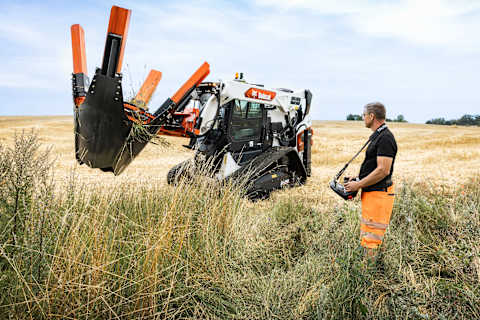
What does Bobcat MaxControl actually do?
- Bobcat MaxControl turns an iPhone or iPad into a remote control for a Bobcat skid-steer loader or compact track loader and its approved attachments.
- One app can pair with several equipped machines, allowing an operator to sit in an excavator and backfill using a loader via remote control.
Solo operators lose time climbing in and out of the cab to check positioning, open a gate, or guide a load. MaxControl combines a hardware kit, connected to the loader’s Selectable Joystick Controls (SJC), with a free iOS app that displays a remote dashboard on your phone. The operator can start the machine, drive it remotely, and return to the seat just as quickly.
Customer Experience
Landscapers were among the first to put the system to work. Markus Poth, Owner and Managing Director of Poth Garten + Landschaftsbau in Darmstadt, Germany, tested Bobcat MaxControl during Bobcat’s customer pilot and summed it up:
"MaxControl provides us with two extra hands, saving time and money."
Where does working outside the cab make the biggest difference?
Operating from outside the cab eliminates blind spots in front of the load and gives operators a clearer perspective in tight work areas.
Positioning timber grapples in tight residential yards
In a backyard, a grapple often picks timber from between a fence, a shed, and a flower bed, where the lift arms and load obscure the tines from the seat. With MaxControl, the operator steps to the side, views the tines and obstacles together, and closes the grapple without guesswork. The Bobcat root grapple is MaxControl-approved, and its curved teeth pick up material without digging into the ground.
Stump grinding near foundation walls
Beside a building wall, wheel guards limit your view of cutting depth, and a single wrong lever movement can push the guard into masonry. The Bobcat stump grinder mounts at a right angle to the operator for a wide view of the cutting area, and its swing arc cuts large stumps without needing to reposition the loader. With MaxControl, the operator stands beside the wall and directly monitors clearance.
Aligning trees during transplanting
A tree spade produces a clean root ball only when centered on the trunk. One tree spade manufacturer advises treating spading from a tractor loader as a two-person job due to limited ground-level visibility. The Bobcat convertible tree transplanter is MaxControl-approved, so a single operator can align the open frame around the trunk from the ground before closing the overlapping blades.
| Task | Problem from the seat | What the remote view changes | MaxControl-approved attachment |
|---|---|---|---|
| Timber and brush in tight yards | Tines hidden by lift arms and load | Side view of tines, fences, and beds | Root grapple, industrial grapple |
| Stump grinding near walls | Guards hide wheel depth and wall clearance | Direct sight line along the wall | Stump grinder |
| Tree transplanting | Trunk centering hard to judge | Ground-level view of blades around the trunk | Convertible tree transplanter (tree spade) |
Customer Experience
Forestry crews rely on the view from the ground for these precision tasks. Magnus Leufstedt, an operator at Magnus Thor AB in Sweden, describes how the crew uses remote control:
"Remote control is invaluable when operating our stump grinder and tree transplanter. When grinding stumps near structures or rock formations, operating from outside the cab gives the precision required to maximize clearing depth safely. For tree transplanting, standing nearby allows us to align trees perfectly straight during replanting."
His colleague Joakim Persson, the company’s owner, adds:
"It is also a major advantage with our timber grapple. Using the remote control provides an optimal line of sight and a completely different overview when moving timber out of tight residential yards."
Will MaxControl work with your loader and attachments?
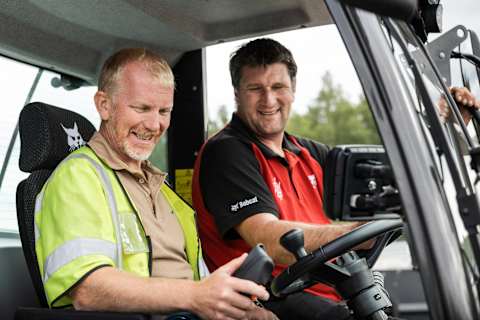
Will MaxControl work with your loader and attachments?
Many buyers assume remote operation requires a new machine. However, MaxControl is retrofittable, so the main deciding factor is whether your loader features SJC.
Attachment approval matters as much as the loader, and Bobcat warns against using unapproved attachments.
What are the limits of remote operation?
The most common surprise is that steering feels reversed when the loader drives toward you, as the machine’s left becomes your right. Bobcat keeps the learning curve short with intuitive smartphone-style touch controls and published safe operating guidelines for solo work.
- Keep bystanders out of the work area, as you will be operating on foot near the machine.
- Use MaxControl for precision positioning tasks and brief solo jobs, returning to the cab for extended production work.
Pre-purchase checklist
- Confirm your loader has SJC and note its series number.
- Ensure every attachment you plan to operate remotely is MaxControl-approved.
- Verify that you and your crew use compatible iOS devices.
- Ask your dealer to install, pair, and demonstrate the kit on your own machine.
- Practice operating in an open field before working near walls, fences, or bystanders.
FAQ – Frequently Asked Questions
Which Bobcat loaders can use MaxControl?
MaxControl works on Bobcat loaders equipped with Selectable Joystick Controls. Your dealer can confirm compatibility for your machine model.
Can I run a stump grinder or grapple remotely?
Yes, provided the attachment is on Bobcat’s MaxControl-approved list. The stump grinder, root grapple, industrial grapple, and convertible tree transplanter are all approved. Always verify compatibility before operating any attachment remotely.
Do I need a dedicated controller or extra hardware?
You need an iPhone or iPad running the free Bobcat MaxControl app. Ensure your devices meet iOS requirements before purchasing.
Is remote operation difficult to learn?
The touch controls are designed to be intuitive, similar to standard smartphone apps, and operators typically master the basics within a few hours. The main adjustment is accounting for reversed steering when driving the machine toward yourself, so practice in an open area first.
Can multiple operators share access to a single machine?
Yes. Peer-to-peer sharing allows multiple authorized users to operate the same loader, and a single app can switch between several equipped machines.
Is het goedkoper om te huren of te bezitten?
Dit hangt af van het jaarlijkse gebruik. Een lader die gedurende het seizoen meerdere betaalde diensten ondersteunt, rechtvaardigt de keuze voor eigendom, terwijl seizoensgebonden of occasioneel werk doorgaans beter gebaat is bij huur via een dealer.
Heb ik een speciale vergunning nodig om er een te trekken?
Controleer het gecombineerde gewicht van het trekvoertuig, de aanhangwagen, de machine en de aanbouwdelen aan de hand van uw rijbevoegdheid. Een standaard Categorie B-rijbewijs dekt combinaties tot een maximaal toegestane massa van 3.500 kg; voor zwaardere combinaties is B96 of BE vereist.
Disclaimer
This content is provided for general informational and guidance purposes only. It may not reflect the specific requirements, conditions, configurations, attachments, applications, terrain, weather, or operating environment relevant to every machine or situation. Any models, configurations, availability, features, and specifications mentioned are provided for illustrative purposes only and may vary by market, region, dealer, and time. Operators, owners, and customers should always assess the actual working conditions and refer to the applicable operator’s manual, service manual, technical documentation, safety instructions, and product specifications for the specific Bobcat model and equipment being used. They should also consult an authorized Bobcat dealer or qualified professional before making operational, maintenance, purchasing, or safety-related decisions.